

Your coupon lives in your customer's phone, and comes up when they walk past your door.
Passby gives your shop a coupon that saves into your customers’ phones and it increases your sales. They get a notification when they walk past your shop, or whenever you decide to send one. There is nothing for you to install and nothing for them to download.
- About two minutes to set up
- No app to build
- No card reader, no terminal
- Works on the phones they already carry
10% off your next visit — JOE'S DINER
How it gets there
Three moving parts, and two of them belong to the phone.
First it has to get into the phone
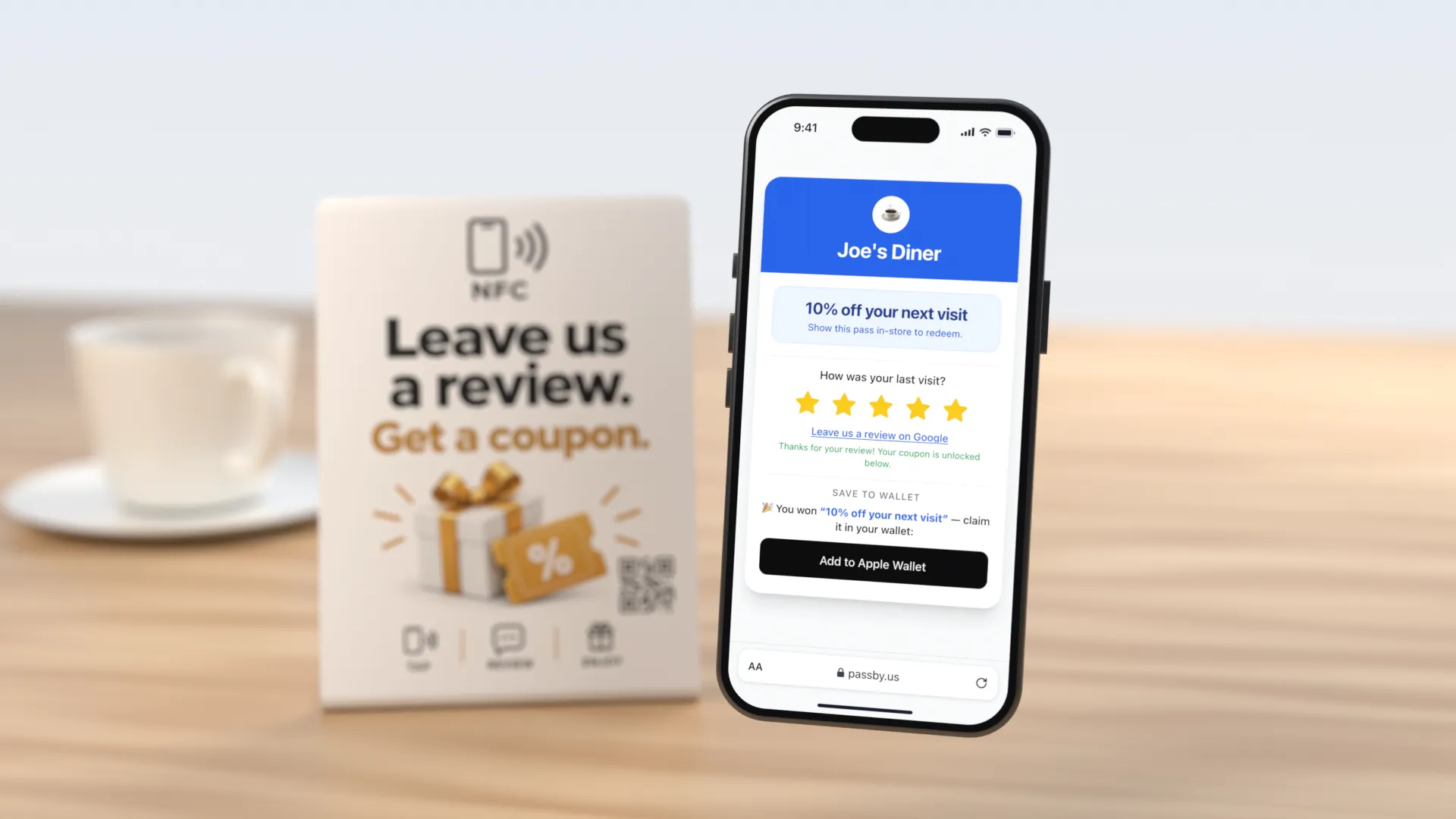
A stand on your counter with your code on it. Their own phone does the rest — a tap, or a look through the camera — with no app to download and nothing for you to hand over.
- 1
They tap the stand
The top of their phone against it, or their camera on its code. No app, no reader, nothing plugged in.
- 2
They rate their visit
Your page opens in the browser they already have and asks how it went. The coupon is right there, rating or not.
- 3
One tap saves it
Into Apple Wallet or Google Wallet, with your address written inside it — which is where everything below this picks up.
Every shop’s card looks like that shop
One layout, fourteen very different shops. Each card’s color is pulled out of its logo, the picture across the top is the photo the shop uploaded, and the line under it is the shop’s own offer — 10% off the next visit, a freebie, a VIP perk, whatever you would put on a flyer.
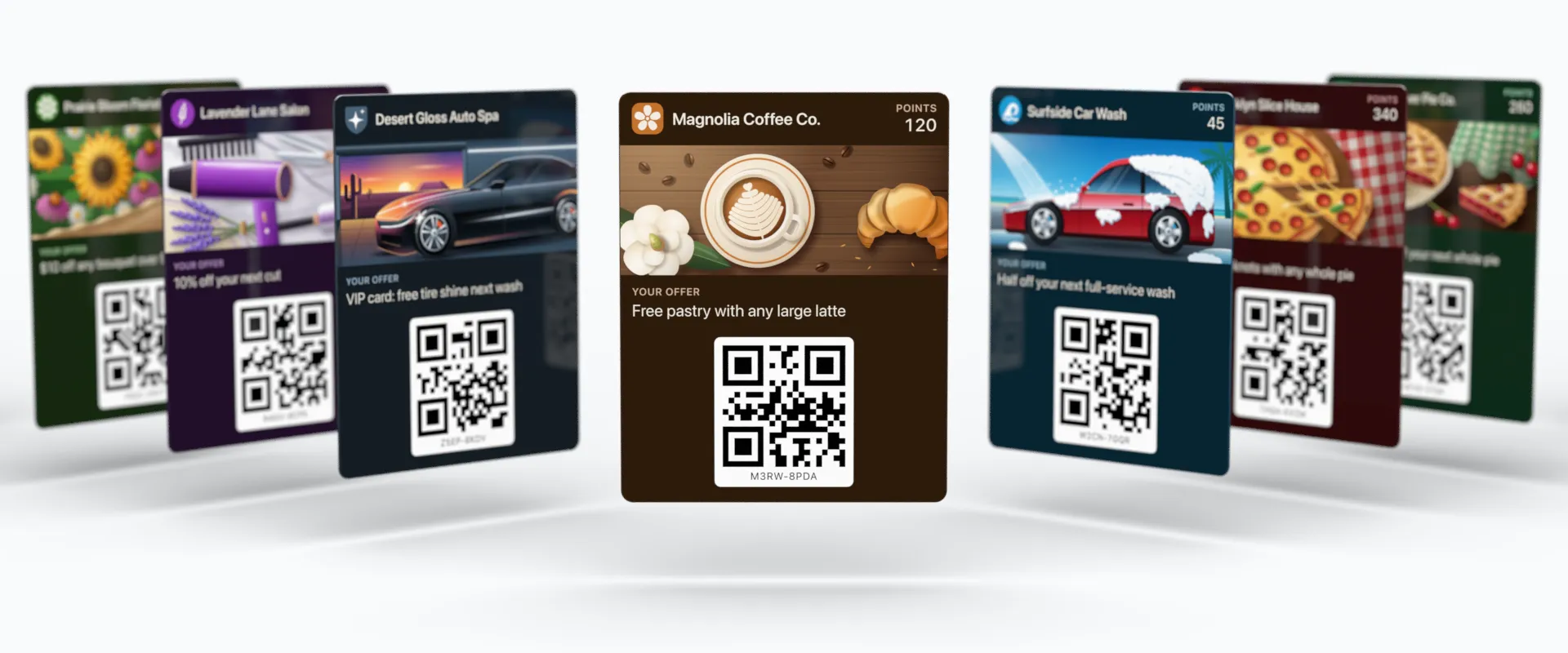
- Magnolia Coffee Co., Coffee shop, Savannah, GA: Free pastry with any large latte
- Surfside Car Wash, Car wash, Clearwater, FL: Half off your next full-service wash
- Brooklyn Slice House, Pizzeria, Brooklyn, NY: Free garlic knots with any whole pie
- Sweet Clover Pie Co., Pie shop, Lancaster, PA: VIP card: 20% off your next whole pie
- Pacific Flow Yoga, Yoga studio, Santa Monica, CA: Bring a friend — first class is free
- Liberty Bagel Co., Bagel shop, Jersey City, NJ: 10% off your next dozen
- Hudson & Main Barbers, Barbershop, Hoboken, NJ: $5 off your next cut, weekdays
- Sunny Side Donuts, Donut shop, Portland, OR: Free donut with any coffee before 9am
- Lone Star Taqueria, Taqueria, Austin, TX: Buy two tacos, get the third free
- Smoky Mountain BBQ, Barbecue, Gatlinburg, TN: 10% off your next order
- Windy City Cycle, Cycling studio, Chicago, IL: VIP card: 25% off your next class pack
- Prairie Bloom Florist, Florist, Wichita, KS: $10 off any bouquet over $50
- Lavender Lane Salon, Hair salon, Charleston, SC: 10% off your next cut
- Desert Gloss Auto Spa, Auto detailing, Scottsdale, AZ: VIP card: free tire shine next wash
These shops are made up, and the pictures are drawings standing in for the photo you would upload. The rest is laid out the way the real Apple Wallet card is — including the points balance, which only shops that give points have. Each card can be redeemed once per offer; write a new offer and every card is good again.
Then every purchase puts points on it
Your till is the phone already in your pocket. Scan the coupon they hold up, type what they spent, and the points land on the card already in their wallet — the same card, not a second one to carry.
The till is a page, not a terminal
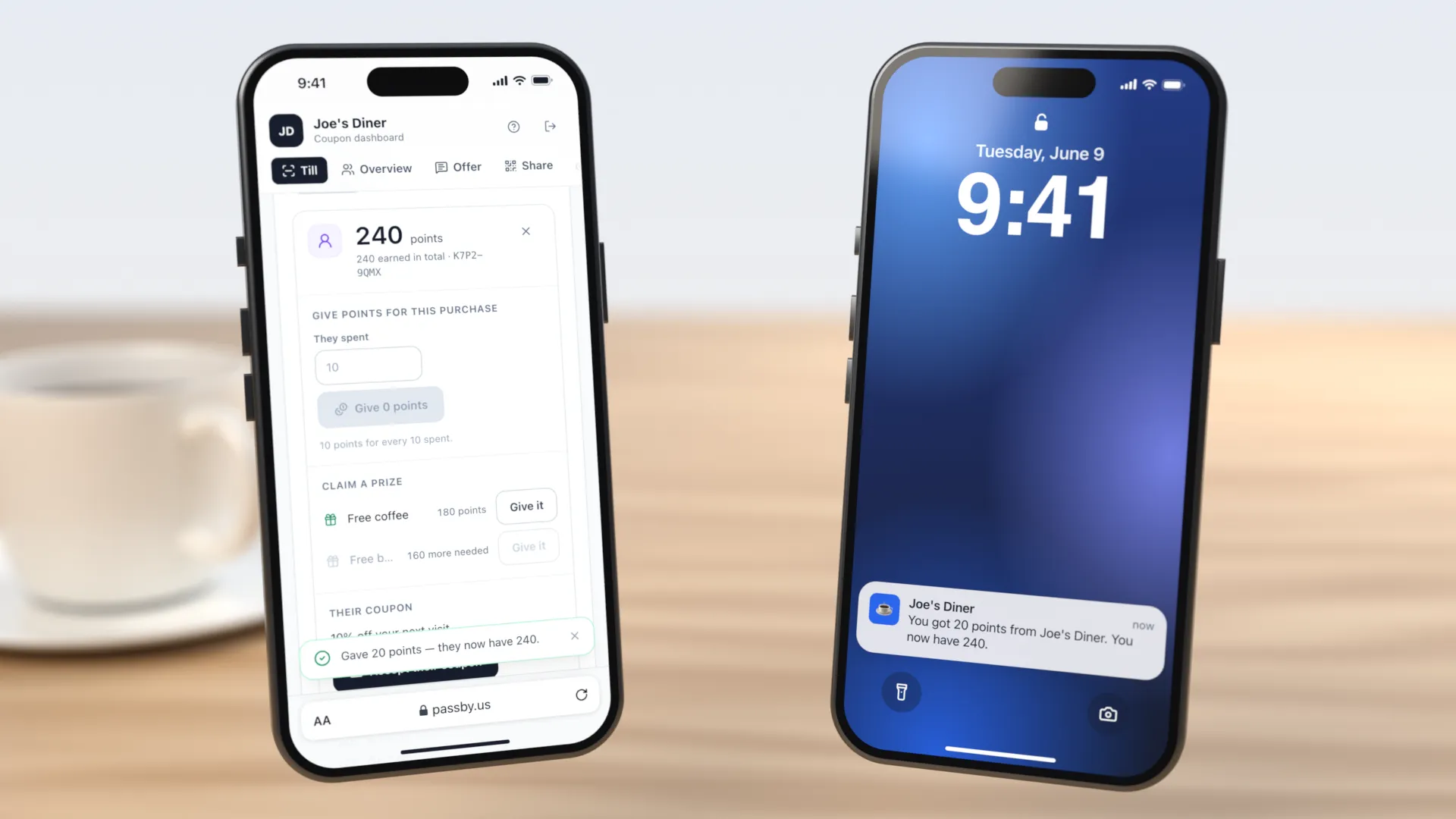
It opens in your dashboard, in the browser of any phone with a camera. Point it at their coupon, type the bill, and the button tells you what it is worth before you press it.
- 1
Your phone scans their card
They hold up the coupon already in their wallet — nothing to tap, sign in to or install. The scan brings them up; on its own it gives nothing.
- 2
You type what they spent
The button works the points out before you press it — at 10 for every $10, a $25 bill is 20 — and the number on it is the number that lands.
- 3
Their phone says so
The card in their pocket updates, and an iPhone announces it: “You got 20 points from Joe’s Diner.” On Android, Google decides whether to show a notice and writes its own.
And the day they spend what they have collected
Points buy things you choose, at prices you set. The customer picks the prize on their own phone — then either holds up a code for your counter to scan, or touches the phone to the sign on it and collects the prize themselves. Nobody has to say a prize name out loud or find it on a till.
They can finish it on the sign themselves
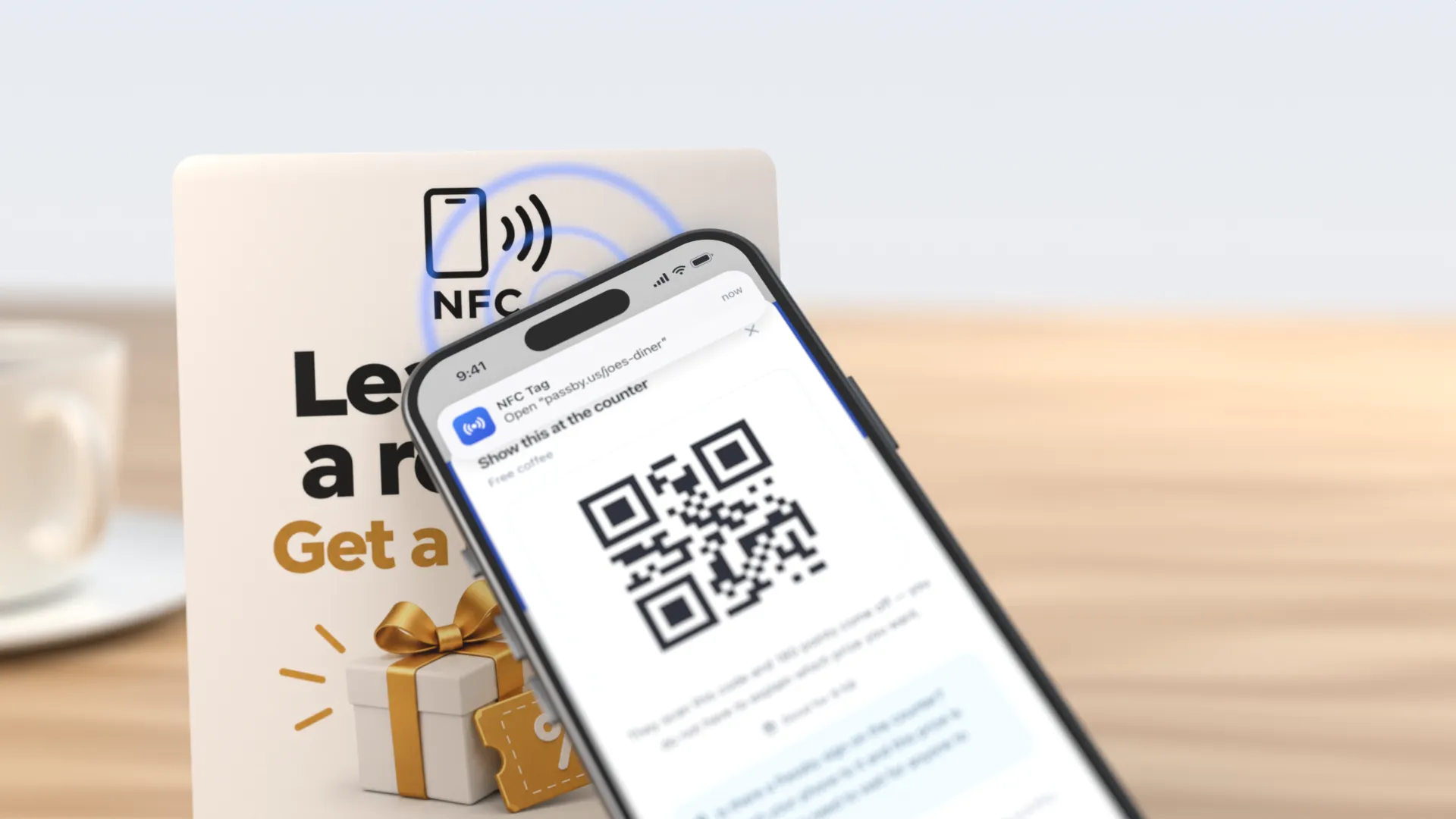
If the stand is already on your counter it does a second job: the same chip that hands out coupons also finishes a prize, and nobody behind the counter touches a thing.
- 1
They press Redeem first
That press is what opens the request, and the order matters: a phone touched to your sign with nothing open just opens your coupon page. Nothing comes off their balance yet.
- 2
They touch it to the sign you already have
The same stand, doing a second job. Their phone’s own operating system opens your page — no app, no reader, and nothing for you to pick up.
- 3
They collect it themselves
Your page asks whether they meant to, they press once, and the points come off on their own phone. All that is left for you is handing it over.
It increases your sales
A coupon in a wallet brings people back, and coming back is the sale. Here is what that is worth set against what it costs — swap in your own average ticket and the sums still work.
- $29
- a month for one shop on the member card, after your first 50 free coupons — or $59 with points and prizes. No print run, no per-message fee.
- 3 visits
- On a $10 ticket, three extra walk-ins in a month have already paid for it. The fourth is profit.
- About 7×
- Twenty people holding your coupon, each coming back one extra time that month: $200 of trade against $29.
It reaches people already outside your door
A walk-past becomes a walk-in.
Most people who pass your shop are not deciding against you — they are not thinking about you at all. The card comes up on the phone of somebody already within 250 meters of your door, which is the one moment a reminder can still turn into a sale the same day. On an iPhone it rises on the lock screen by itself; on Android, Google decides whether to show something and writes the wording itself.
It gives them a reason to pick you again
A balance with you, and none with the shop next door.
Points ride on the same card, and every reminder ends with how close that person is to the next prize. Someone choosing between two similar shops has something saved up at one of them. That is what turns a first visit into a habit, and a regular is the cheapest sale you will ever make.
A slow week costs nothing to answer
One edit, every coupon you have handed out.
Rewrite your offer on a quiet Tuesday and every card already in a customer’s pocket changes to the new one. No print run, no message to pay for, nobody left holding last month’s deal — so putting a better offer in front of everyone who has ever bought from you costs you a sentence.
Sign up, pin your location, share the link
That is the whole setup. About two minutes, and you are signed in at the end.
1.Sign up
Your shop’s name, your email, a password. One screen, and nothing reaches us until you press the button. What comes up next is your own dashboard, already signed in.
2.Pin your location
In your dashboard: type your street address, paste a Google Maps or Apple Maps link, or drag the pin onto your doorway yourself. Dropping it by hand always works.
This is the step nothing works without — a coupon with no coordinates cannot do the thing it is for, so it sits in the wallet and never speaks up. Anywhere in the world: the only pin we refuse is one that is not a place at all.3.Write your offer
One line, up to 120 characters. It is the headline on the card and the sentence that comes up on the lock screen. Write your own or start from one of our examples; until you do, your card carries just your name and sends no reminders. Change it any day, and the cards already handed out change with it.
4.Share the link
Your last screen is a link. Paste it into your Instagram bio or send it in a reply. For the counter, there is a printed NFC stand if you want one.
That is the part that is hard to picture from a description.
The rest of this page is what happens in week two, and the things it cannot do. Read on, or go and pin your door — sign-up does not ask for anything you would need to go and prepare.
After it is in their wallet
Three things people expect to be true here that are not.
It does not get used up
One coupon, not one voucher.
They show the card, you scan it, and the card stays in the wallet with your address still inside it. The same coupon cannot be spent twice on the same deal — but nothing here pulls a pass off somebody's phone, and nothing here needs to.
One edit reaches every card
Including the ones already redeemed.
Write a new offer next month and the cards already in pockets change with it: the Google side is patched once and reaches every Android holder at the same moment, and Apple passes are marked changed and fetch it themselves. Every coupon you have ever handed out goes live again on the new deal. Nobody is left holding last month's.
JUNE
10% off your next visit
JULY
Free cookie with any coffee
Points ride along
No second card, no stamps.
Set what a purchase earns — 10 points for every $10 is where everyone starts, and amounts round down, so $25 earns 20. Your counter scans the coupon and types what was spent, from a phone camera or by typing the eight characters off the back. The balance changes on the card already in their phone. List what the points buy and every reminder ends with how close that person is to the next one.
A customer can pass their own coupon link to a friend. If you have set a referral bonus, it is paid the first time that friend's coupon is scanned at your counter — not when they click.